// checklist
To Do List
- Build Topology
- Build Subnetting Table
- Set up VLANs
- Set up DHCP
- Set up Routing between School & Cloud network
- Set up SSH on all devices
- Set up Firewall
- Set up ACL's
- Block Telnet
- Block FTP
- Set up TFTP Server on the Servers
- SchuelerServer accessible via VLAN
10and20only - LehrerServer accessible via VLAN
10and30only - Allow SSH only on VLAN
10 - Block SSH from non-VLAN 10 devices
- Link Aggregation: MgmtSwitch → CoreSwitch
- Allow HTTPS everywhere
- Allow HTTP on VLAN
10only - Block pings from VLAN
20and30 - Backup all configs to TFTP
172.16.81.10
View sources & references
// 0
Topologie
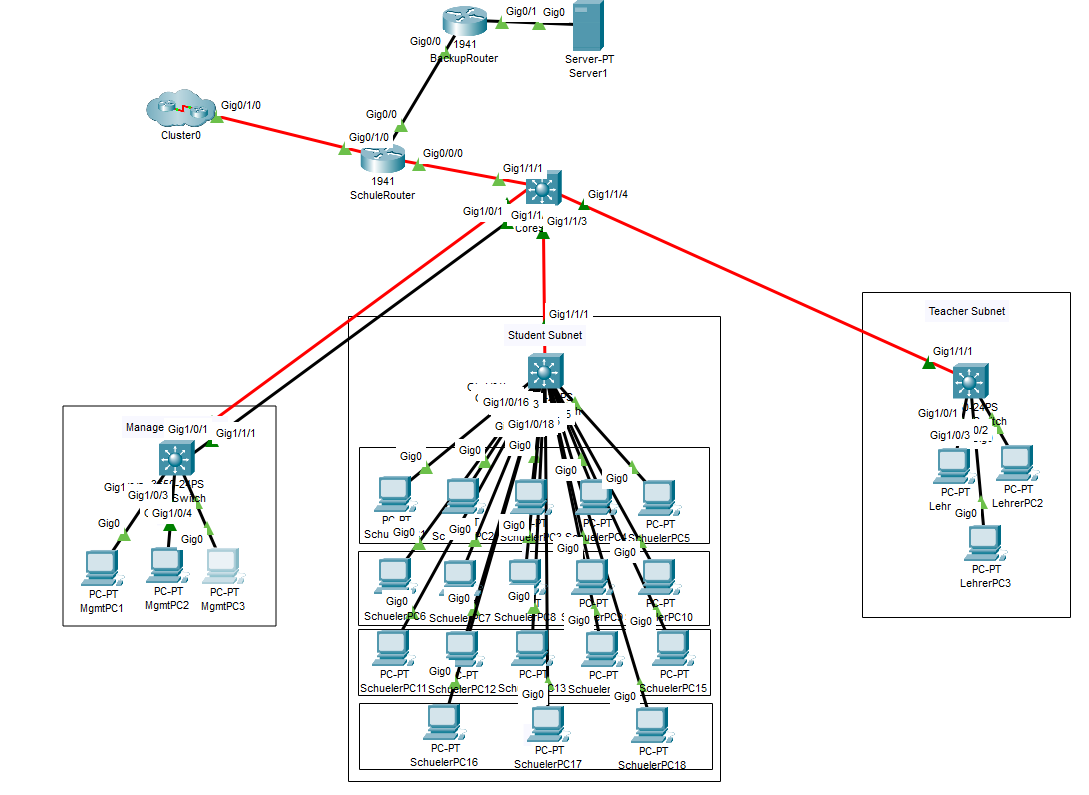
// 1
Routing Tabelle
| Device | Interface | IP | Subnet | Gateway |
|---|---|---|---|---|
| CloudRouter | Gig0/1/0 | 172.16.99.1 | 255.255.255.252 | — |
| Gig0/0 | 172.16.128.1 | 255.255.255.0 | — | |
| SchuelerServer | Gig0 | 172.16.120.10 | 255.255.255.0 | 172.16.120.1 |
| LehrerServer | Gig0 | 172.16.130.10 | 255.255.255.0 | 172.16.10.1 |
| SchuleRouter | Gig0/1/0 | 172.16.99.2 | 255.255.255.252 | — |
| Gig0/0 | 172.16.80.1 | 255.255.255.252 | — | |
| VLAN 10 (mgmt) | Gig0/0/0.10 | 172.16.10.1 | 255.255.255.0 | — |
| VLAN 20 (student) | Gig0/0/0.20 | 172.16.20.1 | 255.255.255.0 | — |
| VLAN 30 (teacher) | Gig0/0/0.30 | 172.16.30.1 | 255.255.255.0 | — |
| MgmtPC 1–3 | NIC | DHCP | DHCP | 172.16.10.1 |
| SchuelerPC 1–18 | NIC | DHCP | DHCP | 172.16.20.1 |
| LehrerPC 1–3 | NIC | DHCP | DHCP | 172.16.30.1 |
| BackupInternet | Gig0/0 | 172.16.80.2 | 255.255.255.252 | — |
| Gig0/1 | 172.16.81.1 | 255.255.255.0 | — | |
| BackupServer | NIC | 172.16.81.10 | — | — |
1.2 — MGMT Interfaces
| Device | IP Address |
|---|---|
| SchuleRouter | 172.16.10.1 / 172.16.20.1 / 172.16.30.1 |
| CoreSwitch | 172.16.10.2 |
| MgmtSwitch | 172.16.10.3 |
| StudentSwitch | 172.16.20.2 |
| TeacherSwitch | 172.16.30.2 |
// 2
Configure IPs on SchuleRouter
SchuleRouter
int gig0/0/0.10
encapsulation dot1Q 10
ip addr 172.16.10.1 255.255.255.0
int gig0/0/0.20
encapsulation dot1Q 20
ip addr 172.16.20.1 255.255.255.0
int gig0/0/0.30
encapsulation dot1Q 30
ip addr 172.16.30.1 255.255.255.0
int gig0/0/0
no shut
Expected output
Output
Router(config)#int gig0/0/0.10
Router(config-subif)#
%LINK-5-CHANGED: Interface GigabitEthernet0/0/0.10, changed state to up
%LINEPROTO-5-UPDOWN: Line protocol on Interface GigabitEthernet0/0/0.10, changed state to up
Router(config-subif)#encapsulation dot1Q 10
Router(config-subif)#ip addr 172.16.10.1 255.255.255.0
Router(config-subif)#int gig0/0/0.20
Router(config-subif)#encapsulation dot1Q 20
Router(config-subif)#ip addr 172.16.20.1 255.255.255.0
Router(config-subif)#int gig0/0/0.30
Router(config-subif)#encapsulation dot1Q 30
Router(config-subif)#ip addr 172.16.30.1 255.255.255.0
Router(config-subif)#int gig0/0/0
Router(config-if)#no shut
// 3
DHCP Pools — SchuleRouter
SchuleRouter
ip dhcp pool mgmt
network 172.16.10.0 255.255.255.0
default-router 172.16.10.1
dns-server 172.16.10.1
ip dhcp pool schueler
network 172.16.20.0 255.255.255.0
default-router 172.16.20.1
dns-server 172.16.20.1
ip dhcp pool lehrer
network 172.16.30.0 255.255.255.0
default-router 172.16.30.1
dns-server 172.16.30.1
Expected output
Output
Router(config)#ip dhcp pool mgmt
Router(dhcp-config)#network 172.16.10.0 255.255.255.0
Router(dhcp-config)#default-router 172.16.10.1
Router(dhcp-config)#dns-server 172.16.10.1
Router(dhcp-config)#ip dhcp pool schueler
Router(dhcp-config)#network 172.16.20.0 255.255.255.0
Router(dhcp-config)#default-router 172.16.20.1
Router(dhcp-config)#dns-server 172.16.20.1
Router(dhcp-config)#ip dhcp pool lehrer
Router(dhcp-config)#network 172.16.30.0 255.255.255.0
Router(dhcp-config)#default-router 172.16.30.1
Router(dhcp-config)#dns-server 172.16.30.1
// 4
Switch VLAN Configuration
Trunk uplinks to CoreSwitch, access ports assigned to their respective VLANs per device type.
CoreSwitch
CoreSwitch
int gig1/1/1
sw m t
int gig1/1/2
sw m t
int gig1/1/3
sw m t
int gig1/1/4
sw m t
MgmtSwitch
MgmtSwitch
vlan 10
name mgmt
vlan 20
name schueler
vlan 30
name lehrer
int range gig1/0/1-24
sw m a
sw a vlan 10
int gig1/1/1
sw m t
SchuelerSwitch
SchuelerSwitch
vlan 10
name mgmt
vlan 20
name schueler
vlan 30
name lehrer
int range gig1/0/1-24
sw m a
sw a vlan 20
int gig1/1/1
sw m t
LehrerSwitch
LehrerSwitch
vlan 10
name mgmt
vlan 20
name student
vlan 30
name lehrer
int range gig1/0/1-24
sw m a
sw a vlan 30
int gig1/1/1
sw m t
// 5
Configure IPs on CloudRouter
CloudRouter
int gig0/0
ip addr 172.16.120.1 255.255.255.0
no shut
int gig0/1
ip addr 172.16.130.1 255.255.255.0
no shut
int gig0/1/0
ip addr 172.16.99.1 255.255.255.252
no shut
Expected output
Output
CloudRouter(config)#int gig0/0
CloudRouter(config-if)#ip addr 172.16.120.1 255.255.255.0
CloudRouter(config-if)#no shut
CloudRouter(config-if)#int gig0/1
CloudRouter(config-if)#ip addr 172.16.130.1 255.255.255.0
CloudRouter(config-if)#no shut
CloudRouter(config-if)#int gig0/1/0
CloudRouter(config-if)#ip addr 172.16.99.1 255.255.255.252
CloudRouter(config-if)#no shut
// 6
Configure Inter-Network Routing
SchuleRouter
SchuleRouter
ip route 172.16.120.0 255.255.255.0 172.16.99.1
ip route 172.16.130.0 255.255.255.0 172.16.99.1
CloudRouter
CloudRouter
ip route 172.16.20.0 255.255.255.0 172.16.99.2
ip route 172.16.30.0 255.255.255.0 172.16.99.2
✓ At this point you should be able to ping both
SchuelerServer (172.16.120.10) and LehrerServer (172.16.130.10) from both VLANs.
// 7
Configure SSH on All Network Devices
Repeat the following pattern on each device, adjusting the hostname, VLAN interface, and IP address accordingly.
MgmtSwitch
MgmtSwitch
hostname MgmtSwitch
no ip domain-lookup
ip domain-name school.local
crypto key generate rsa
! -- When prompted, enter 1024
username admin privilege 15 secret Cisco
line vty 0 4
transport input ssh
login local
ip ssh version 2
exit
int vlan 10
ip addr 172.16.10.3 255.255.255.0
ip default-gateway 172.16.10.1
StudentSwitch
StudentSwitch
hostname StudentSwitch
no ip domain-lookup
ip domain-name school.local
crypto key generate rsa
! -- When prompted, enter 1024
username admin privilege 15 secret Cisco
line vty 0 4
transport input ssh
login local
ip ssh version 2
exit
int vlan 20
ip addr 172.16.20.2 255.255.255.0
ip default-gateway 172.16.20.1
TeacherSwitch
TeacherSwitch
hostname TeacherSwitch
no ip domain-lookup
ip domain-name school.local
crypto key generate rsa
! -- When prompted, enter 1024
username admin privilege 15 secret Cisco
line vty 0 4
transport input ssh
login local
ip ssh version 2
exit
int vlan 30
ip addr 172.16.30.2 255.255.255.0
ip default-gateway 172.16.30.1
CoreSwitch
CoreSwitch
hostname CoreSwitch
no ip domain-lookup
ip domain-name school.local
crypto key generate rsa
! -- When prompted, enter 1024
username admin privilege 15 secret Cisco
line vty 0 4
transport input ssh
ip ssh version 2
login local
exit
int vlan 10
ip addr 172.16.10.2 255.255.255.0
ip default-gateway 172.16.10.1
SchuleRouter
SchuleRouter
hostname SchuleRouter
no ip domain-lookup
ip domain-name school.local
crypto key generate rsa
! -- When prompted, enter 1024
username admin privilege 15 secret Cisco
line vty 0 4
transport input ssh
login local
ip ssh version 2
exit
// 8
Set Up Firewalls — SchuleRouter
ACL — VLAN 10 (Management)
- 1–2 Allow TFTP to SchuelerServer and LehrerServer
- 3–5 Block Telnet, FTP
- 6–7 Allow DHCP (bootpc/bootps)
- 8 Permit all VLAN 10 traffic
ACL_VLAN10_IN
ip access-list extended ACL_VLAN10_IN
permit udp 172.16.10.0 0.0.0.255 host 172.16.120.10 eq 69
permit udp 172.16.10.0 0.0.0.255 host 172.16.130.10 eq 69
deny tcp any any eq 23
deny tcp any any eq 20
deny tcp any any eq 21
permit udp any any eq bootpc
permit udp any any eq bootps
permit ip 172.16.10.0 0.0.0.255 any
ACL — VLAN 20 (Schueler)
- 1 Allow TFTP to SchuelerServer only
- 2 Deny TFTP to LehrerServer
- 3–5 Block FTP, Telnet
- 6–7 Allow DHCP
- 8–9 Block ICMP echo, allow echo-reply
- 10–11 Block HTTP, allow HTTPS
- 12 Permit all VLAN 20 traffic
ACL_VLAN20_IN
ip access-list extended ACL_VLAN20_IN
permit udp 172.16.20.0 0.0.0.255 host 172.16.120.10 eq 69
deny udp 172.16.20.0 0.0.0.255 host 172.16.130.10 eq 69
deny tcp any any eq 20
deny tcp any any eq 21
deny tcp any any eq 23
permit udp any any eq bootpc
permit udp any any eq bootps
deny icmp any any echo
permit icmp any any echo-reply
deny tcp any any eq 80
permit tcp any any eq 443
permit ip 172.16.20.0 0.0.0.255 any
ACL — VLAN 30 (Lehrer)
- 1 Allow TFTP to LehrerServer only
- 2 Deny TFTP to SchuelerServer
- 3–5 Block FTP, Telnet
- 6–7 Block ICMP echo, allow echo-reply
- 8–9 Allow DHCP
- 10–11 Block HTTP, allow HTTPS
- 12 Permit all VLAN 30 traffic
ACL_VLAN30_IN
ip access-list extended ACL_VLAN30_IN
permit udp 172.16.30.0 0.0.0.255 host 172.16.130.10 eq 69
deny udp 172.16.30.0 0.0.0.255 host 172.16.120.10 eq 69
deny tcp any any eq 20
deny tcp any any eq 21
deny tcp any any eq 23
deny icmp any any echo
permit icmp any any echo-reply
permit udp any any eq bootpc
permit udp any any eq bootps
deny tcp any any eq 80
permit tcp any any eq 443
permit ip 172.16.30.0 0.0.0.255 any
8.2 — Restrict SSH to VLAN 10
Apply the same ACL on every network device to restrict VTY access to VLAN 10 only.
All devices
ip access-list standard ACL_MGMT_VTY
permit 172.16.10.0 0.0.0.255
line vty 0 15
access-class ACL_MGMT_VTY in
transport input ssh
// 9
Apply ACLs — SchuleRouter
SchuleRouter
int gig0/0/0.10
ip access-group ACL_VLAN10_IN in
int gig0/0/0.20
ip access-group ACL_VLAN20_IN in
int gig0/0/0.30
ip access-group ACL_VLAN30_IN in
Expected output
Output
SchuleRouter(config)#int gig0/0/0.10
SchuleRouter(config-subif)#ip access-group ACL_VLAN10_IN in
SchuleRouter(config-subif)#int gig0/0/0.20
SchuleRouter(config-subif)#ip access-group ACL_VLAN20_IN in
SchuleRouter(config-subif)#int gig0/0/0.30
SchuleRouter(config-subif)#ip access-group ACL_VLAN30_IN in
// 10
Set Up TFTP Backup Routes
BackupInternet — routes to school VLANs
BackupRouter
ip route 172.16.10.0 255.255.255.0 172.16.80.1
ip route 172.16.20.0 255.255.255.0 172.16.80.1
ip route 172.16.30.0 255.255.255.0 172.16.80.1
SchuleRouter — route to backup subnet
SchuleRouter
ip route 172.16.81.0 255.255.255.0 172.16.80.2
// 11
Backup Configs to TFTP
Run on each device. When prompted for the remote host, enter 172.16.81.10.
All devices
copy run tftp
! -- Remote host: 172.16.81.10
Example output (SchuleRouter)
SchuleRouter
SchuleRouter#copy run tftp
Address or name of remote host []? 172.16.81.10
Destination filename [SchuleRouter-confg]?

Writing running-config...!!
[OK - 3819 bytes]

3819 bytes copied in 0 secs
// 12
Configure EtherChannels
LACP link aggregation between CoreSwitch and MgmtSwitch.
CoreSwitch
CoreSwitch
int range gig1/0/1, gig1/1/1
shutdown
sw m t
sw nonegotiate
channel-group 1 mode active
int port-channel 1
sw m t
sw nonegotiate
exit
int range gig1/0/1, gig1/1/1
no shut
end
MgmtSwitch
MgmtSwitch
int range gig1/0/1, gig1/1/1
shutdown
sw m t
sw nonegotiate
channel-group 1 mode active
exit
int port-channel 1
sw m t
sw nonegotiate
exit
int range gig1/0/1, gig1/1/1
no shut